
Databricks Metastore-Level ABAC Policies (Beta): One Policy for Every Catalog
Post · UC Governance · Beta 2026-09-17 · Updated 2026-10-08
Topic summary · original diagrams · no autoplay
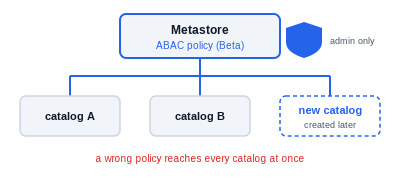
Metastore-level ABAC policies entered Beta on September 17, 2026. You can attach one row filter, column mask, GRANT or DENY policy to the metastore itself, and it applies to every catalog, schema and supported object under it, including catalogs created later.
Three facts before you start:
- It is Beta. Check your organization's rules for preview features before you rely on it in production.
- It requires the metastore admin role. Only metastore admins can create, update or delete these policies.
- A wrong policy affects the whole metastore. Every catalog, schema and table that matches its conditions is hit at once, including catalogs created later. Test the same rule on a narrow scope, such as one schema, before you attach it at the metastore.
What is new
- Beta on September 17, 2026, listed in the AWS, Azure and GCP release notes.
- The metastore, the root of the Unity Catalog hierarchy, is now a valid policy scope. All four ABAC policy types work there: row filter, column mask, GRANT, and DENY (DENY is itself in Beta).
- A metastore-level policy uses the same fields, conditions and evaluation as any other ABAC policy, including DENY precedence, workspace bindings and row filter composition. Only the scope differs.
- A metastore cannot be tagged directly. Tag conditions match the governed tags on catalogs and lower-level objects.
- You manage these policies in Catalog Explorer, with SQL (Databricks Runtime 19 or above), or through the REST API.
Releases are staged. Your account may get the feature a week or more after the release date.
When to use it, and when not to
Use it for a rule that truly applies everywhere, such as masking every column tagged ssn, and only when governed tags are applied consistently across catalogs.
Do not use it for a rule that belongs to one team or one catalog; attach that at catalog or schema level. Avoid it while tagging is incomplete, because untagged columns stay unprotected. It also does not fit if you depend on Unity Catalog-managed disaster recovery (see risks), or if you need GRANT or DENY on non-catalog objects such as external locations, storage credentials, shares or connections. Not sure whether ABAC, a row filter or a dynamic view fits? Try the UC row-level security method picker.
Getting started
- Check permissions and compute. Creating, updating and deleting needs the metastore admin role. Listing and viewing needs
READ METADATAor metastore admin. Changing policies with SQL needs Databricks Runtime 19 or above. You also needEXECUTEon the UDF that does the filtering or masking. - Create the masking UDF. Official example from the policies page:
CREATE FUNCTION ssn_to_last_nr (ssn STRING, nr INT) RETURNS STRING RETURN right(ssn, nr); - Test on a narrow scope first. The official schema-level version of the same mask:
CREATE POLICY mask_ssn
ON SCHEMA prod.customers
COLUMN MASK ssn_to_last_nr
TO us_analysts EXCEPT admins
FOR TABLES
MATCH COLUMNS has_tag_value('pii', 'ssn') AS ssn
ON COLUMN ssn
USING COLUMNS (4);
Query the tables as a member of the target group and as an exempt user, then drop the test policy.
- Attach at the metastore. In Catalog Explorer: Catalog > gear icon > Metastore > Policies tab > New policy. The Scope field is set to the current metastore. Or in SQL, with the official example:
CREATE POLICY ssn_mask
ON METASTORE
COLUMN MASK ssn_to_last_nr
TO `account users` EXCEPT `HR admins`
FOR TABLES
MATCH COLUMNS has_tag('ssn') AS ssn
ON COLUMN ssn
USING COLUMNS (4);
ON METASTOREalways targets the metastore you are working in. Adding a metastore name is a syntax error. For DENY and GRANT examples and the REST payload, see the official page. - Verify, and keep the rollback ready.
SHOW POLICIES ON METASTORE;

SELECT *
FROM system.information_schema.abac_policy_definitions
WHERE on_securable_type = 'METASTORE';

-- Rollback
DROP POLICY ssn_mask ON METASTORE;
SHOW EFFECTIVE POLICIESon a catalog or schema also lists policies inherited from the metastore.
Permission risks
- Blast radius. A
TO `account users`mask with a loose tag condition masks data for nearly everyone in every catalog, including jobs and dashboards that run as those principals. - Tags become access control. Whoever can apply governed tags can change what the policy matches. Databricks recommends restricting tag creation and changes to data stewards or governance admins, and auditing tag changes.
EXCEPTmeans fully exempt. Exempt principals see unmasked, unfiltered data. Keep the list short.- Disaster recovery gap. Unity Catalog-managed disaster recovery does not replicate metastore-level policies. After a failover, objects they protected are replicated without protection.
- Quotas. 100 policies can be attached directly to the metastore for row filter and column mask, and another 100 for GRANT and DENY.
- Audit. Policy changes are logged under
createPolicyanddeletePolicywithon_securable_typeset toMETASTORE.
Staged rollout
Move in three steps: one test schema, then one catalog, then the metastore. Apply each step in a quiet window with the DROP POLICY statement ready, and confirm results with a target user and an exempt user before the next step. If you also serve tables to outside engines, read Cross-engine ABAC to see how ABAC policies apply to those readers.
Sources
- Release note, September 17, 2026: Metastore-level ABAC policies are in Beta (also in the Azure Databricks September 2026 notes)
- Docs: Metastore-level ABAC policies (Beta) (Azure: Metastore-level ABAC policies)
- Docs: Create and manage row filter and column mask policies · Best practices for ABAC policies
Checked against official Databricks documentation on 2026-10-08. Context Lab is an independent education site and is not affiliated with Databricks, Inc. Not a compliance guarantee.