
Databricks Cross-Engine ABAC: Govern External Spark and Iceberg Reads
Post · UC Governance · GA 2026-10-01 · Updated 2026-10-08
Topic summary · original diagrams · no autoplay
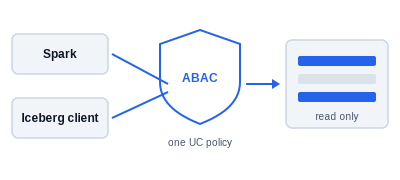
Cross-engine ABAC became generally available on October 1, 2026. External engines such as Apache Spark, through Delta or the Iceberg REST catalog, can now read Unity Catalog managed tables while ABAC policies, row filters and column masks are still enforced. You no longer need an unmasked copy just to serve an outside engine.
Two facts to know before you start: Databricks enforces the policies on serverless compute that you pay for, and external engines can only read policy-protected tables.
What is new
- GA on October 1, 2026, listed in the AWS, Azure and GCP release notes.
- When an external engine queries a table that has ABAC policies, row filters or column masks attached, Databricks uses a specialized serverless compute layer to filter the data and return a sanitized result.
- This covers ABAC policies and standalone row filters and column masks.
- It works with Unity Catalog managed tables with catalog commits, authenticated with OAuth machine-to-machine (M2M) or a personal access token (PAT).
Releases are staged. Your account may get the feature a week or more after the release date.
When to use it, and when not to
Use it when a team outside Databricks runs Spark or an Iceberg client and needs governed tables, and you want one set of policies in Unity Catalog instead of rules copied into each engine.
Do not rely on it when the external engine must write to a protected table: writes are not supported while fine-grained controls are enforced, so a writer has to be exempted from the policy. It also does not support dynamic views, projecting VARIANT columns, filtering on BINARY columns, or column masks whose return type differs from the column type. Large aggregations may run slower.
Getting started
- Enable external data access (metastore admin). In a workspace attached to the metastore: Catalog > gear icon > Metastore > Details tab > turn on External data access. It is off by default.
- Grant privileges. The querying principal needs
EXTERNAL USE SCHEMA, plusSELECTon the table,USE CATALOGandUSE SCHEMA. Only the parent catalog owner can grantEXTERNAL USE SCHEMA, andALL PRIVILEGESdoes not include it.GRANT EXTERNAL USE SCHEMA ON SCHEMA catalog_name.schema_name TO `user@company.com` - Use a managed table with catalog commits.
-- New table (Databricks Runtime 16.4 and above)
CREATE TABLE <catalog>.<schema>.<table> (id INT, name STRING)
USING delta
TBLPROPERTIES ('delta.feature.catalogManaged' = 'supported');

-- Existing managed table (Databricks Runtime 18.0 and above)
ALTER TABLE <catalog>.<schema>.<table>
SET TBLPROPERTIES ('delta.feature.catalogManaged' = 'supported');
Then attach your ABAC policies, row filters or column masks as you would for Databricks users.
- Configure the external Spark session. For the Delta path you need Delta-Spark 4.1+ and the Unity Catalog Spark connector 0.4+. The key setting is
ServerSidePlanning.enabled, which turns on enforcement. Excerpt from the official config:"spark.sql.catalog.<uc-catalog-name>": "io.unitycatalog.spark.UCSingleCatalog", "spark.sql.catalog.<uc-catalog-name>.uri": "<workspace-url>", "spark.sql.catalog.<uc-catalog-name>.auth.type": "oauth", "spark.sql.catalog.<uc-catalog-name>.auth.oauth.uri": "<oauth-token-endpoint>", "spark.sql.catalog.<uc-catalog-name>.auth.oauth.clientId": "<oauth-client-id>", "spark.sql.catalog.<uc-catalog-name>.auth.oauth.clientSecret": "<oauth-client-secret>", "spark.sql.catalog.<uc-catalog-name>.ServerSidePlanning.enabled": "true",For the Iceberg path you need Iceberg-Spark 1.11+ and Apache Spark 4.0+, with a REST catalog pointing at Unity Catalog:
"spark.sql.catalog.<uc-catalog-name>": "org.apache.iceberg.spark.SparkCatalog",
"spark.sql.catalog.<uc-catalog-name>.type": "rest",
"spark.sql.catalog.<uc-catalog-name>.uri": "<workspace-url>/api/2.1/unity-catalog/iceberg-rest/",
Copy the full property list, including package versions, from the official page.
- Query and verify. Run a normal query, then compare the rows and masked columns with what the same principal sees inside Databricks.
SELECT * FROM <uc-catalog-name>.<schema>.<table>;
Cost and permission risks
- Enforcement is billed. Cross-engine ABAC runs on serverless compute and you are charged for it. Databricks publishes rates on its Cross-engine ABAC pricing page; we do not quote a figure here. Usage shows up in
system.billing.usagewithbilling_origin_product = 'EXTERNAL_COMPATIBILITY'. The official example, broken down by user (change the dates to your period):SELECT usage_date, sku_name, identity_metadata.run_as, SUM(usage_quantity) AS `DBUs consumed by cross-engine ABAC` FROM system.billing.usage WHERE usage_date BETWEEN '2026-06-01' AND '2026-07-01' AND billing_origin_product = 'EXTERNAL_COMPATIBILITY' GROUP BY 1, 2, 3 ORDER BY 1; - External engines are read-only on protected tables. Any principal you exempt so it can write also reads unfiltered data. Treat that principal as privileged and keep the list short.
EXTERNAL USE SCHEMAis a data-egress privilege. It lets a principal obtain temporary credentials from outside Databricks. Grant it to named service principals per schema, not to broad groups.- Snapshot consistency. Concurrent writes during query planning can make self-joins and multi-scan queries read different snapshots and return incorrect results. Schedule external reads away from heavy writes where that matters.
Sources
- Release note, October 1, 2026: Cross-engine attribute-based access controls (ABAC) is now generally available (also in the Azure Databricks October 2026 notes)
- Docs: Cross-engine attribute-based access controls (ABAC)
- Docs: Enable external data access to Unity Catalog · Billable usage system table reference
Checked against official Databricks documentation on 2026-10-08. Context Lab is an independent education site and is not affiliated with Databricks, Inc. Not a compliance guarantee.