
BI RLS on Databricks: OAuth vs service principal
Guide · UC / governance wedge · Education only · Not a compliance guarantee
Unity Catalog row-level security applies as whoever Databricks thinks is querying — not whoever clicked the BI chart. OAuth / user-to-machine (U2M) can carry each analyst. A shared PAT, service principal, or machine-to-machine (M2M) connection collapses everyone into one identity. Fabric table mirrors / shortcuts add a third trap: UC filters and masks do not automatically follow Fabric end users.
Pick the identity model first, then pick ABAC / row filter / dynamic view with the UC RLS method picker.
Topic summary · original diagrams · no autoplay
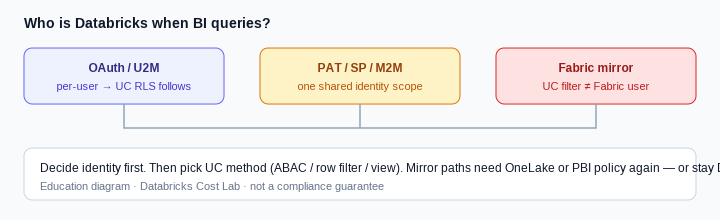
Decision tree
- Does BI authenticate each person into Databricks?
- Yes (OAuth / U2M) → UC grants, row filters, ABAC, and views evaluate as that user. Prefer this when you need true per-person country/region RLS into the lakehouse.
- No (PAT / service principal / M2M) → One shared scope. Filters still run, but as the SP. Everyone with that connection sees the SP’s rows (or nothing). Do not call this “per-analyst RLS.”
- Is data copied into Fabric / OneLake (mirror or shortcut)?
- Yes → UC row filters / column masks on Databricks do not apply as the Fabric user. Re-apply policy in OneLake / Power BI, or keep DirectQuery → Databricks SQL so UC still evaluates.
- No → Stay on live query to Databricks; identity (step 1) dominates.
- Then choose the UC method (many tables → ABAC; one simple table → row filter; join mapping → dynamic view). See the picker examples.
Fiction: Ada (HK) vs Ben (SG)
Retail lakehouse table sales.orders with country = HK / SG. Ada should see only HK; Ben only SG. Platform already has a UC row filter (or ABAC tag) keyed on country.
- Sigma / Row Zero / similar with OAuth into Databricks: Ada’s session is Ada. UC returns HK rows. Ben gets SG. Same lakehouse policy, two people.
- Same tool with one workspace PAT / SP: Both Ada and Ben query as
bi-bot. Ifbi-botis allowed both countries (or none), the chart is wrong for “personal” RLS — the bug is identity, not the filter function. - Fabric mirror of
sales.orders: After mirror, a Fabric report user is not evaluated by UC. Re-bind RLS in the Fabric / PBI layer, or stop mirroring for this sensitive table and DirectQuery DBSQL under OAuth.
Names and tools are educational. Wire real SSO and grants from your IdP + UC docs.
What this page does not do
- No copied production SQL from vendor docs — use their pages for syntax.
- No claim that any BI vendor “inherits UC for free” without checking the connection type.
- No compliance certification. Pair with your security review.