
Databricks Serverless Jobs: Standard Performance Mode for One-Time Runs
Post · Cost · Released 2026-09-11 (release note: "now available") · Updated 2026-10-08
Topic summary · original diagrams · no autoplay
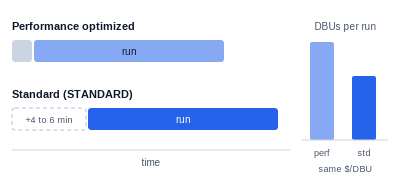
Since September 11, 2026, you can set performance_target to STANDARD on one-time runs in the Jobs API. The release note says the option is "now available"; it carries no GA or preview label. Standard mode runs serverless tasks on the same SKU but consumes fewer DBUs, and in exchange the run can take 4 to 6 minutes longer to start.
This post covers what the mode changes for cost, when the trade is worth it, the exact request field, and the traps that come with one-time runs.
What is new
- Released September 11, 2026, listed in the AWS, Azure and GCP release notes under "Standard performance mode is now available for one-time runs in the Jobs API".
- The one-time run endpoint,
POST /api/2.2/jobs/runs/submit, takes a top-levelperformance_targetfield. Documented values arePERFORMANCE_OPTIMIZED(the default) andSTANDARD. - Apache Airflow's
DatabricksSubmitRunOperatoralso supports it, according to the release note. - The target does not apply to tasks that run on Serverless GPU compute.
- Saved jobs already have the same choice in the UI: turning off Performance optimized on the job details page selects standard mode.
Releases are staged. Your account may get the feature a week or more after the release date.
Standard vs performance optimized
- Standard: uses less compute to reduce cost. Startup latency can be 4 to 6 minutes higher, depending on compute availability and optimized scheduling.
- Performance optimized: starts and runs faster. Databricks designs it for time-sensitive workloads.
- Billing: both modes use the same SKU, so the $/DBU rate does not change. Standard mode consumes fewer DBUs. Databricks does not publish a fixed saving on that page, so measure your own runs.
When to use it, and when not to
Use it for serverless one-time runs that can wait a few minutes: Airflow-triggered batch steps, backfills, nightly reprocessing, or ad hoc runs submitted from a script.
Skip it when a run has a tight deadline or something downstream waits on it, when the task runs on Serverless GPU (no effect), and for classic compute, where the setting does not apply. For workloads that must succeed, also reconsider runs/submit itself (see risks below).
Getting started
- Check serverless prerequisites. The workspace needs Unity Catalog, and the workload must support standard access mode. Serverless supports notebook, Python script, dbt, Python wheel and JAR tasks. Python script, Python wheel and dbt tasks on serverless need an
environment_key. - Submit the run with the field set. The fields below all come from the API reference; the names and path are placeholders.
curl -X POST "https://${DATABRICKS_HOST}/api/2.2/jobs/runs/submit" \
  -H "Authorization: Bearer ${DATABRICKS_TOKEN}" \
  -H "Content-Type: application/json" \
  -d '{
    "run_name": "nightly-backfill",
    "performance_target": "STANDARD",
    "tasks": [
      {
        "task_key": "backfill",
        "notebook_task": {
          "notebook_path": "/Workspace/Users/someone@example.com/backfill"
        }
      }
    ]
  }'
The response returns a
run_id. - Check which mode actually ran. Call
GET /api/2.2/jobs/runs/getwith thatrun_idand readeffective_performance_target. It can differ from what you requested, depending on whether the job type supports the mode. - For Airflow, confirm the parameter name in your
apache-airflow-providers-databricksversion before you change DAGs. The release note confirms support but not the syntax. - Compare DBUs per run.
system.billing.usagerecords the mode inproduct_features.performance_target. The query below is this site's check, built on documented columns:SELECT usage_date, usage_metadata.job_run_id AS job_run_id, product_features.performance_target AS performance_target, billing_origin_product, sku_name, SUM(usage_quantity) AS dbus FROM system.billing.usage WHERE product_features.performance_target IS NOT NULL AND usage_date >= date_sub(current_date(), 30) GROUP BY ALL ORDER BY usage_date DESC, dbus DESC;Run the same workload once in each mode and compare
dbus. Multiply by your $/DBU for the SKU to get dollars. If DBUs are new to you, start with What Is a Databricks DBU?, and see Jobs vs All-Purpose Compute for how the SKU, not only the DBU count, sets the bill.
Cost risks
- One-time runs are not saved and do not retry. The API reference warns that Databricks cannot auto-optimize serverless compute for them after a failure. Every manual rerun is billed again. For important work, Databricks points to
jobs/createplusjobs/run-now. - They do not show in the Jobs UI. Track them with
runs/getand the billing table, or the spend is easy to miss. - Slower start has a cost elsewhere. If a dashboard refresh or another pipeline waits on the run, budget for the extra minutes.
- Fewer DBUs is not a fixed discount. Do not promise finance a percentage. Report measured DBUs per run.
Staged rollout
Switch one non-urgent workload first, confirm effective_performance_target reads STANDARD, and compare a week of DBUs and start times against the previous mode. Then move the next group. Keep deadline-bound runs on performance optimized.
Sources
- Release note, September 11, 2026: Standard performance mode is now available for one-time runs in the Jobs API (also in the Azure Databricks September 2026 notes)
- API reference: Create and trigger a one-time run
- Docs: Select a performance mode (Azure: Run your Lakeflow Jobs with serverless compute) · Billable usage system table reference
Checked against official Databricks documentation on 2026-10-08. Context Lab is an independent education site and is not affiliated with Databricks, Inc.