
Genie One MCP Server Is GA: Migrate Before the Beta Endpoint Shuts Down on October 31
Post · AI Practice · GA 2026-09-25 · Updated 2026-10-08
Topic summary · original diagrams · no autoplay
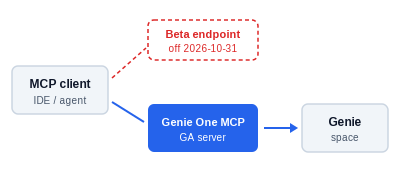
Deadline first: the Beta Genie MCP endpoint /api/2.0/mcp/genie is deprecated and will be sunset on October 31, 2026. If an agent, Claude, ChatGPT or Cursor setup still calls it, move it to the GA Genie One MCP server before then.
Migration steps
- Find every MCP client config that points at the old endpoint.
- Replace the URL with the Unity Gateway URL for
system.ai.genie_one_mcp:# Deprecated Beta endpoint (sunset 2026-10-31, OAuth scope: genie) https://<workspace-hostname>/api/2.0/mcp/genie # GA Genie One MCP server in Unity Gateway https://<workspace-hostname>/ai-gateway/mcp-services/system.ai.genie_one_mcp - Update OAuth. The old endpoint uses the
geniescope. For on-behalf-of-user authentication on the new server, include theai-gatewayscope. - In your workspace, open Unity Gateway > MCPs to confirm the MCP and copy its exact URL.
- If you govern access with MCP policies, apply them to
system.ai.genie_one_mcpin Unity Gateway. - Ask one test question from each client and check that the answer and data access match what that user sees in Genie One.
What is new
- GA on September 25, 2026 as a Databricks-provided MCP Service,
system.ai.genie_one_mcp, governed through Unity Gateway. Listed in the AWS, Azure and GCP release notes. - Any MCP client or agent can send a natural-language question. Genie searches your data, writes SQL, and returns an answer grounded in Genie Ontology with deep links back to the cited Databricks sources.
- Unity Catalog permissions are enforced on every request.
- Clients that support MCP Apps get an interactive View with progress, charts and results inline. No extra setup is needed; other clients receive text.
Releases are staged. Your account may get the feature a week or more after the release date.
When to use it, and when not to
Use it for business questions across your workspace where accuracy depends on what the data means: metric definitions, business terms, table relationships. Genie resolves these through Genie Ontology, which Databricks says gives more accurate answers than an agent writing SQL straight against raw tables.
Use something else when you only need one curated Genie Agent from Python (Databricks points to AI Bridge tool examples), or when you have an existing integration tied to a specific agent (see the legacy Genie Agent MCP server in the docs). It is also a poor fit for bulk extraction, because results are truncated and size-limited.
Getting started (new setup)
- Get the URL. Go to Unity Gateway > MCPs in your workspace, or build it from the pattern above.
- Connect the client with OAuth. Databricks recommends on-behalf-of-user OAuth, so answers follow each user's own grants and links click through cleanly. Service principal authentication is supported for automated workloads.
- Know the tools. Your agent normally calls
genie_askand handles the rest:genie_ask: starts a response and returnsconversation_id,response_idandstatus. Pass aconversation_idto continue a thread.genie_poll_response: fetches progress and the final answer. Wait for one poll to finish before sending the next.genie_get_query_result: fetches the full SQL result when the truncated answer is not enough.genie_cancel_response: cancels an in-flight turn.view_ask: offered instead ofgenie_askto MCP Apps clients.
- Pick a SQL warehouse if needed by passing
warehouse_idin the_metaparameters ofgenie_askorview_ask. - Tune behavior in Genie One. The server honors your Chat in Genie One configuration, so improve answers there rather than in each client.
Cost and permission risks
- Billing. The server uses Chat in Genie One and follows Genie pricing. Per the AI/BI and Genie One release notes (August 3, 2026), free usage of Genie One and Genie Agents is extended through January 31, 2027, and budget controls do not apply during that promotion.
- Service principals are billed now. The promotion covers users only. Since September 24, 2026, Genie usage by service principals is billed at standard pay-as-you-go pricing. An automated agent that connects as a service principal costs money today.
- Track it. Genie usage appears in
system.billing.usagewithbilling_origin_product = 'GENIE'; free usage uses theGENIE_FREE_USAGESKU. Official example, free versus billed DBUs per user this month:SELECT u.identity_metadata.run_as AS user, u.usage_metadata.genie.surface AS genie_surface, SUM(CASE WHEN u.sku_name = 'GENIE_FREE_USAGE' THEN u.usage_quantity ELSE 0 END) AS free_dbus, SUM(CASE WHEN u.sku_name != 'GENIE_FREE_USAGE' THEN u.usage_quantity ELSE 0 END) AS paid_dbus FROM system.billing.usage u WHERE u.billing_origin_product = 'GENIE' AND u.usage_date >= DATE_TRUNC('MONTH', CURRENT_DATE) GROUP BY u.identity_metadata.run_as, u.usage_metadata.genie.surface ORDER BY user, genie_surface - Permissions follow the identity. Results are scoped to what the calling identity can access in Unity Catalog. With a service principal, that is the service principal's grants, not the end user's. Keep its grants narrow.
Sources
- Release note, September 25, 2026: The Genie One MCP server is now generally available (also in the Azure Databricks September 2026 notes)
- Docs: Genie One MCP server
- AI/BI and Genie One release notes 2026: free usage extended through January 31, 2027 (August 3, 2026); service principal usage billed at standard pricing (September 24, 2026)
- Docs: Monitor and understand your Genie cost
Checked against official Databricks documentation on 2026-10-08. Context Lab is an independent education site and is not affiliated with Databricks, Inc.